How do you write a good AI prompt for ChatGPT, Claude or Gemini?
A good AI prompt names the task, supplies relevant context, states constraints and describes the output you want. Add an example when format or judgment is hard to explain. Then inspect the result and revise one weakness at a time. Clear evidence and a review step matter more than clever prompt phrases.
Open the photograph at full size
Photograph: Diagram: AI Journey
Read the full description of this diagram
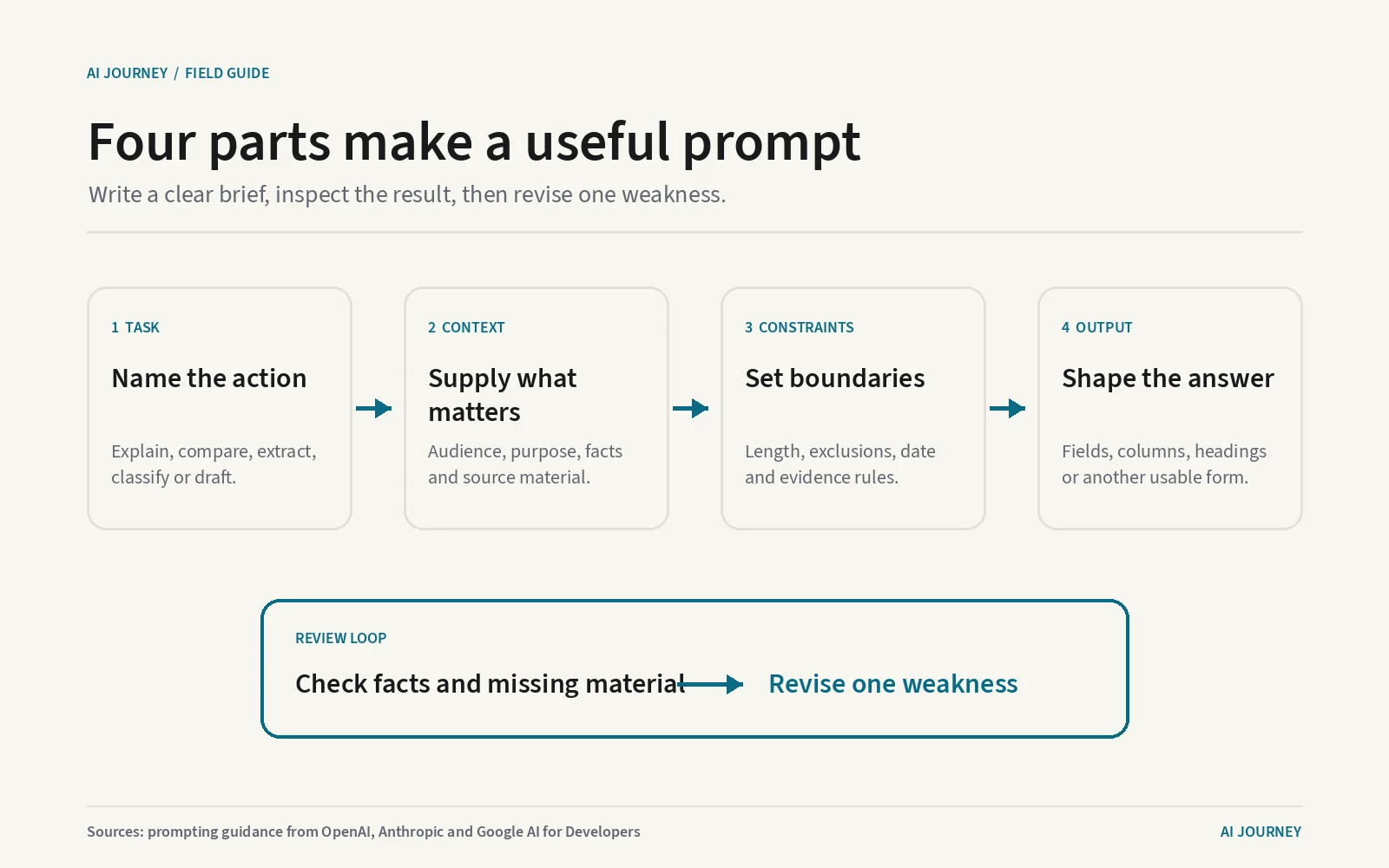
The diagram shows four connected prompt cards. Task states the action the model should perform. Context supplies facts, audience and source material. Constraints set boundaries such as length, exclusions and dates. Output names the format, fields or headings required. A review loop below checks accuracy and missing material, then sends one specific correction back into the prompt.
A useful prompt is a small brief. Tell the model what to do, give it the facts it needs, set boundaries and name the form of the answer. Add examples only where the judgment is ambiguous. Then review what came back and revise the prompt against a visible failure, not against a vague feeling.
Build the prompt from four useful parts
A prompt is the instruction and context sent to an AI model. OpenAI, Anthropic and Google’s current guidance uses different examples but converges on clarity, relevant context, explicit output and iteration. A reusable prompt can be built from four parts.
First, state the task as an action: compare, extract, explain, classify or draft. “Help with this report” is open ended. “Summarise the report’s three cost risks” gives the model a job that can be checked.
Second, provide context. Context is the background and source material needed for the answer. Name the intended reader, purpose and facts the model may use. If the answer must come only from an attached policy, say so and ask it to mark anything the policy does not establish. Context is useful when it changes the answer; a biography of the person asking usually does not.
Third, set constraints. A constraint is a boundary the answer must respect, such as length, language, date range, excluded topics or evidence standard. Put hard requirements together so they are easy to inspect. Resolve conflicts yourself. “Be exhaustive” and “keep it brief” may require a priority the model cannot infer.
Fourth, specify output. Ask for a table with named columns, a memo with headings, a numbered procedure or valid JSON with stated fields. JSON is a structured text format software can parse. For a human reader, ordinary headings may be better. The output shape should match the next use, not simply look elaborate.
Here is the pattern in one short prompt: “Compare the attached plan pages for a small US team. Use only the pages. Include monthly price, published limits and missing information. Return a table with columns for plan, price and limits, followed by a brief recommendation. Cite the page beside each figure.”
Add examples when instructions leave room for judgment
An example helps when a label, tone or format can be interpreted several ways. Few-shot prompting means including a small number of input and output examples before the new case. Google and Anthropic both recommend examples for tasks where demonstration clarifies the rule.
For email classification, show one example that belongs in each label and explain difficult borders. For extraction, show the exact date and currency format. Keep the examples consistent with the written instruction. If an example contradicts a rule, the model has to guess which one wins.
Separate source material from instructions. A delimiter is a visible marker such as XML tags,
triple quotation marks or headings that identify sections. Anthropic’s guidance recommends structure
for complex prompts, and Google’s guide similarly uses organized blocks. You might place a contract
inside <source> tags and the requested fields inside <output>. Delimiters do not create security,
but they make the intended boundaries easier for the model and the reviewer to see.
Treat pasted or retrieved text as data, not trusted instructions. Prompt injection is an attempt inside source material to redirect the model away from the user’s rules. A clear separation helps, but a high-risk workflow also needs software controls over tools and data. No sentence saying “ignore malicious instructions” is a complete defense.
Break difficult work into visible stages
Google’s prompting guidance recommends dividing complex work into components, and the vendor guides describe iteration. For consequential work, make those stages visible. Ask for an extraction first, check it, then request analysis. Ask for an outline before a long draft. Ask the model to compare the finished draft with a checklist and identify gaps before revising.
This is decomposition, splitting one difficult task into smaller tasks with inspectable outputs. It helps because an incorrect source fact can be caught before it becomes the premise of a polished recommendation. It also tells you where a prompt fails. If extraction is right and judgment is wrong, change the decision rule rather than rewriting every instruction.
Do not ask the model merely to confirm that its first answer is correct. Give it a different check: recalculate from listed inputs, quote the sentence supporting each claim, or compare the output with a fixed rubric. A rubric is a set of stated scoring criteria. Verification still belongs to the person or system using the result, especially for medical, legal, financial or employment decisions.
Our guide to using ChatGPT covers the product workflow. The same prompt structure works in Claude and Gemini, although tools, context and plan limits differ.
Common prompt advice that needs qualification
A role such as “act as an editor” can set vocabulary and perspective. It cannot grant credentials or make unsupported facts true. Replace theatrical roles with useful detail: audience, domain, allowed sources and the decision being made.
Politeness is fine, but courtesy words are not a quality control. Clear requests and feedback matter. Long prompts are not automatically better either. Necessary examples and evidence can be long; repetition and irrelevant rules spend the model’s context window and may introduce conflict.
Asking for citations can make review easier when the product has search or source access. It does not guarantee a real or relevant source. Open the link and confirm that it supports the exact sentence. For current facts, use the vendor hubs for OpenAI, Anthropic and Google or the dated ChatGPT versus Claude comparison rather than relying on a model’s memory.
A phrase promising perfect reasoning, secret modes or universal results should be treated as a claim to test. Models change and prompts interact with the task. Keep a test set, a fixed group of real examples, and score every revision against it. One impressive answer is not a reliable prompt.
What it means for you
Begin with four labels: Task, Context, Constraints and Output. Fill each in plain language. Add one or two examples only when they settle a genuine ambiguity. For complex work, split the process into a draft, an evidence check and a revision.
Save the prompt with its model, date and test results. When performance changes, you can distinguish a model update from an edited instruction. Compare plans on the plans page and API meters on the pricing page only after the task works, and check what the finished prompt actually costs with the token counter. The best prompt is not the longest or cleverest. It is the shortest clear brief that repeatedly produces a result you can check.
Questions people also ask
- What is the best prompt format for ChatGPT?
- There is no universal best wording. A reliable starting structure is task, relevant context, constraints and requested output. Add examples for ambiguous judgments, then test the prompt on several real cases instead of polishing one demonstration.
- Should you tell an AI model to act as an expert?
- A role can set audience, vocabulary or perspective, but it does not give the model verified expertise. State the concrete task and evidence standard as well. Check important claims even when the response sounds professionally confident.
- Do longer prompts produce better answers?
- Only when the added words supply useful context or requirements. Repetition, conflicting rules and irrelevant background can make a request harder to follow. Keep necessary detail, remove noise and test the result on more than one example.
Where these numbers come from
Every figure on this page was read from the pages below on the dates shown, and nothing here is taken from another publisher's article. When a vendor changes a number on this page, the change is logged in what changed in AI and the page is corrected with a new date.
Primary sources
OpenAI Help Center prompting guide, covering clear requests, context, tone and iterative refinement
read
Anthropic prompt engineering documentation, covering templates, variables and reusable structure
read
Google Gemini prompting strategies, covering clear instructions, examples, structure and iteration
read
Published by Kawsar. How this site collects and checks data.