What does the OpenAI status page tell you when ChatGPT is down?
The OpenAI status page tells you whether OpenAI has acknowledged a broad incident affecting ChatGPT, APIs, Codex or another listed service. It does not test your account, browser, network, region or exact feature. Match your symptom to the named component and time, then run local checks if no matching incident appears.
Open the photograph at full size
Photograph: Diagram: AI Journey
Read the full description of this diagram
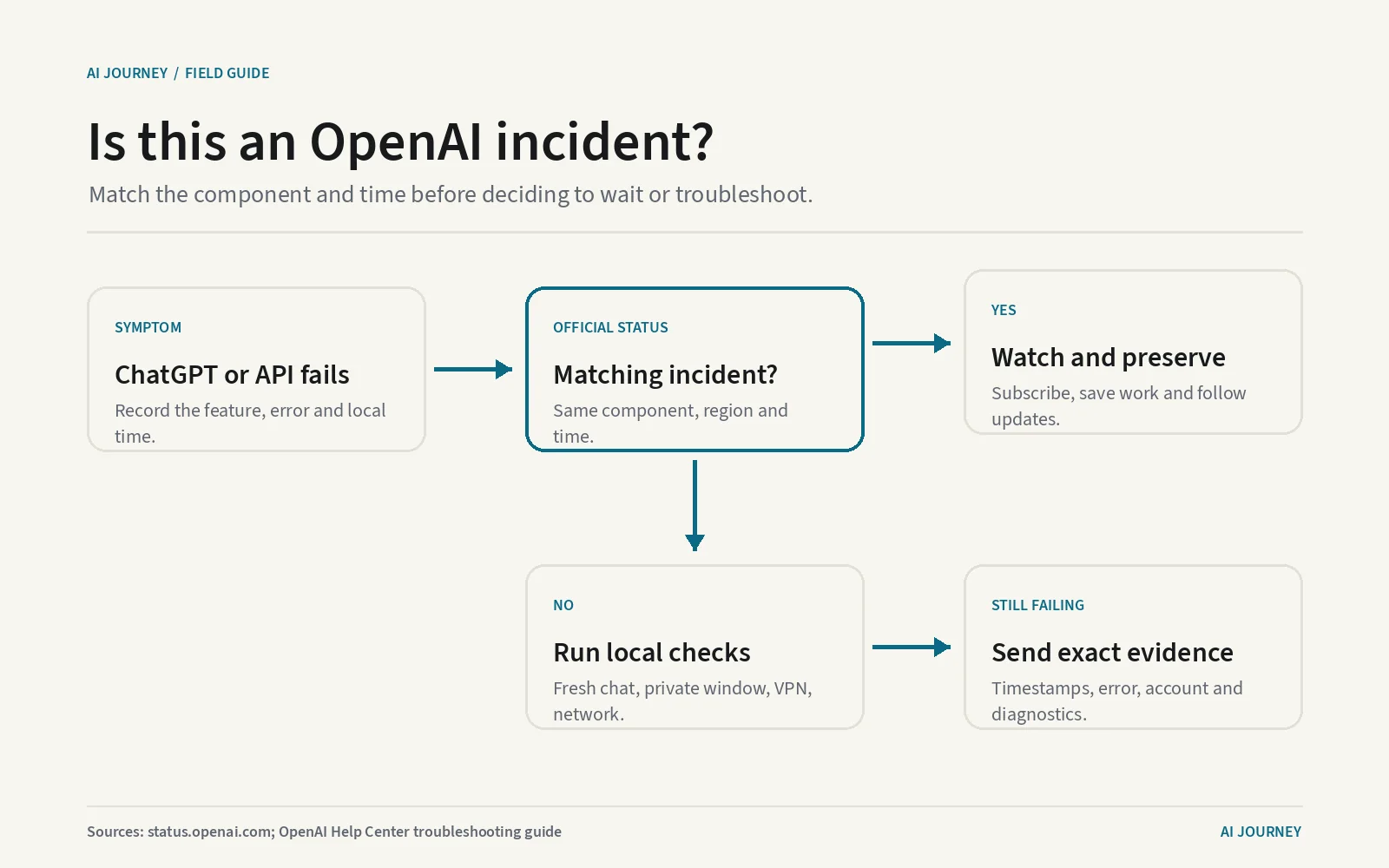
The diagram begins with a ChatGPT or OpenAI API symptom. It asks whether the official OpenAI status page names the affected component, region or feature at the same time. A matching incident leads to subscribing, recording the incident and waiting for updates. No match leads to a fresh chat, private browser window, disabled extensions and VPN, and a second network or device. The last panel says to contact support with timestamps and diagnostics if the problem remains.
OpenAI’s status page reports incidents the company has recognized across named services. It is the best first check for a widespread failure, but not a test of your individual account. Read the affected component, timing and update text. If they do not match your symptom, work through local browser, network and account checks.
Read the component before the color
The large status at the top is a summary. Below it, OpenAI lists components including APIs, ChatGPT, Codex, FedRAMP and its Ads Platform on the page fetched on 7 September 2026. A component is a separately reported part of the service. An image-generation incident may not affect ordinary text, and an API latency incident may not stop the ChatGPT website.
OpenAI places an important qualification on the page: availability metrics are reported in aggregate across tiers, models and error types, and an individual customer’s availability may vary by subscription tier, model and API feature. Aggregate means many users and conditions combined into one overall view. Green therefore means no broad recognized issue is currently shown. It does not mean OpenAI has successfully run your exact request from your device.
Match four details before deciding an incident explains the failure: the product, feature, geography and time. If the entry says API image generation in one region and your symptom is a ChatGPT login in another, the overlap may be weak. If it says increased ChatGPT conversation errors at the same minute, waiting is more sensible than clearing every browser setting.
Our live ChatGPT status page places OpenAI’s report beside the product record. The OpenAI hub connects status with the company’s models, prices and updates.
An incident page is a timeline, not a diagnosis
An incident entry usually moves through short operational states. Investigating means OpenAI has recognized symptoms and is finding the cause. Identified means a likely cause has been found. Monitoring means a change has been applied and staff are watching recovery. Resolved means OpenAI considers the published incident over. These labels describe the service response, not a technical explanation promised to every reader.
Read the timestamps and affected services in each update. An incident that began after your failure cannot explain the earlier event unless OpenAI later revises its start time. An entry that says only some users were affected should not be rewritten as a complete global outage. Save the incident URL and the relevant time if the interruption matters for a client, deadline or internal record.
Subscribing to updates can reduce repeated checking during an acknowledged incident. It does not repair failed work or guarantee that a completed update reaches every channel instantly. Save text outside the chat before refreshing, and avoid submitting the same API operation repeatedly if it can create duplicate side effects.
An API side effect is a real change caused by a request, such as sending a message or writing a record. A timed-out screen does not always prove the server did nothing. Software teams should attach an idempotency strategy where the operation supports one. Idempotency means retrying safely without performing the same change twice.
When the status page shows no matching problem
OpenAI’s Help Center recommends a practical sequence. Start a new chat and retry the request. Refresh the page or sign out and back in. Open a private browser window, which temporarily removes much of the stored session state. Disable extensions that alter page content, privacy or security. Turn off a VPN or secure DNS service temporarily if policy permits, then try a different network or device.
Do one change at a time and note the result. A VPN, or virtual private network, routes traffic through another network and can affect location or filtering. Secure DNS changes how domain names are resolved and may apply blocking rules. If ChatGPT works on mobile data but not office Wi-Fi, the evidence points toward the network path rather than a general OpenAI incident.
For repeated errors, record the exact message, model or feature, local time with time zone, account plan, browser version and whether another network worked. OpenAI’s troubleshooting guide describes collecting a HAR file for support in appropriate cases. A HAR file is a browser log of web requests. It can contain sensitive data, so sanitize and share it only through the support process that requested it.
Usage limits are not outages. A plan-limit message means the account has exhausted an allowance even if the service is healthy. Compare current terms on the plan page. API rate limits also differ from an incident: they restrict how quickly one organization can send requests. The guide to OpenAI API pricing explains those controls.
What the history can and cannot prove
The official status history is useful for establishing that OpenAI acknowledged a particular incident and when it posted each update. It can support a service review, explain clustered errors or show that a failure was not isolated to one employee.
It cannot prove that every failed request during that interval was caused by the incident. Nor can an empty interval prove that nobody had a problem. Recognition and publication take time, narrow issues may stay below the aggregate threshold, and local failures are outside the page’s scope.
For team reporting, pair the official entry with your own logs. Record request timestamps, response codes, affected functions and recovery. An HTTP response code is the numeric result a web service returns, such as a success or rate-limit code. Compare those observations with the incident timeline without altering either one to fit the other.
What it means for you
When ChatGPT or an OpenAI API fails, check the official status first. If a named incident matches the component and time, preserve work, subscribe and wait for updates. If it does not, test a fresh chat, private window, extensions, VPN and another network in that order. Contact support with exact evidence when the failure persists.
Use the ChatGPT versus Claude comparison and related guide to ChatGPT usage after service returns; neither can diagnose an outage. The status page is a valuable public incident log. Its value comes from reading its scope precisely, not treating one green word as a guarantee about every user.
Questions people also ask
- Can ChatGPT be down when OpenAI status is green?
- Yes. OpenAI says its availability metrics are aggregate across tiers, models and error types, and that individual availability can vary. A local browser, account, network, region or specific feature can fail without a broad incident banner.
- Does a resolved OpenAI incident mean every user is fixed?
- It means OpenAI considers the published incident resolved at the service level. Your failed request may still need a refresh, new login or retry, and a separate local issue can continue. Test again and preserve the incident link if the timing matters.
- Where can I see earlier ChatGPT outages?
- OpenAI's official status history lists past incident entries and their updates. Use the entry for the affected component and time. The history documents acknowledged incidents, not every individual error experienced by every account.
Where these numbers come from
Every figure on this page was read from the pages below on the dates shown, and nothing here is taken from another publisher's article. When a vendor changes a number on this page, the change is logged in what changed in AI and the page is corrected with a new date.
Published by Kawsar. How this site collects and checks data.